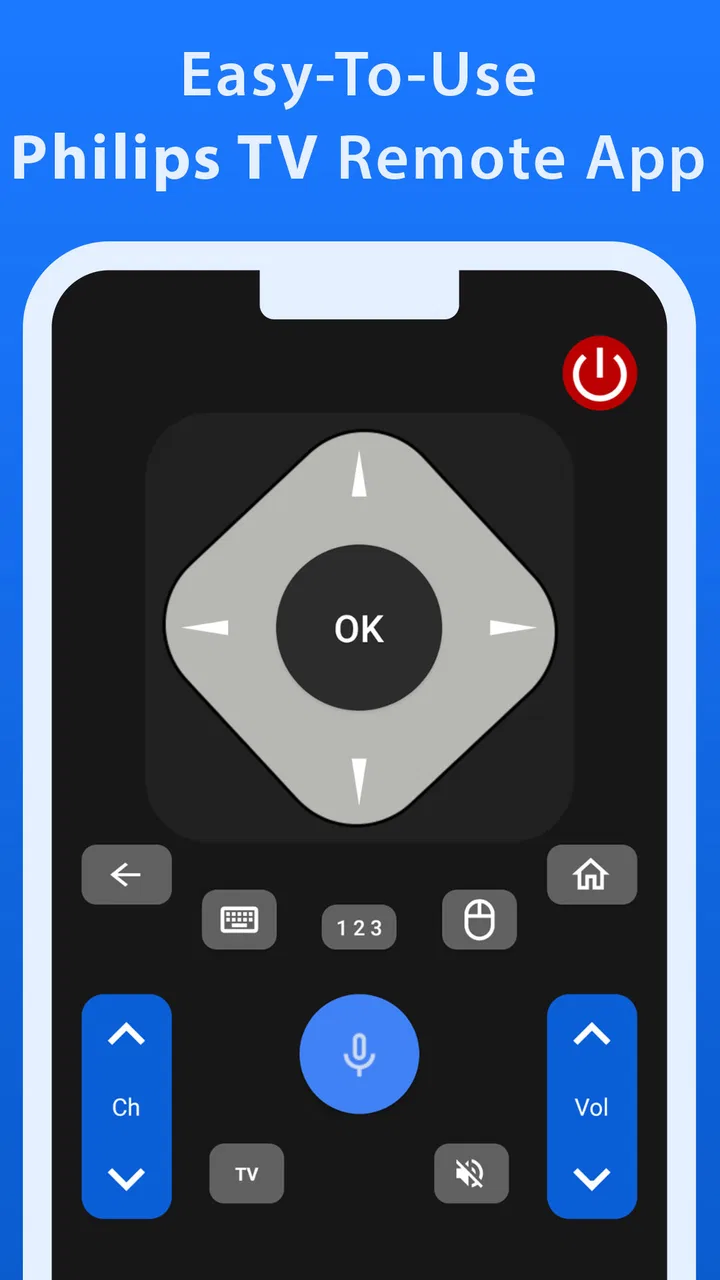
Philips TV Remote
- 4.4
- Rating
- 500.00K
- Installs
- Free
- Price

 Analysis by App-foxy
When a Philips television remote goes missing, the problem is rarely the television itself. It is usually the small daily tasks—changing the volume, switching inputs, pausing a program—that suddenly become inconvenient. Philips TV Remote is designed for that exact situation: it turns a compatible mobile device into a remote-control option for a Philips TV. I reviewed it as a practical House & Home app rather than as something exciting, and that is the right way to judge it. Its appeal depends on whether it can make ordinary television use easier without becoming more troublesome than the physical remote.
The app is made by Mobile Tools Shop and is available free of charge. That matters because the basic decision is not whether to replace a working remote with an expensive accessory; it is whether a no-cost app is worth trying when the original controller is lost, damaged, or simply out of reach. The store listing presents it as an all-in-one remote, while the short description keeps things very simple: Philips TV. In my experience, that straightforward purpose is its main strength. There is no need to learn a new entertainment platform or reorganize a smart home. The app is meant to put familiar television control on a screen you already carry.
How Philips TV Remote fits into everyday television use
The first thing I would clarify to a potential user is that this is a remote-control utility, not an alternative television interface. It does not turn a phone into a streaming service, a program guide, or a replacement for the TV’s own menus. Its usefulness comes from reducing the distance between you and the controls. That makes it especially relevant in a home where the remote is often misplaced, shared between several people, or left on a different floor.
You May Also Like

 Blood Strike: 2.5 Anniversary
Blood Strike’s Loadouts Turn Every Drop Into a Tactical Gamble
A close look at Blood Strike’s custom loadouts: how fast access to signature weapons reshapes its battle royale rhythm, rewards preparation, and narrows the gap between fights.

 Pandora - Music & Podcasts
Pandora’s Music Is Easy to Start, but Harder to Recover
Pandora’s strength is its low-effort path from a seed to a station. Its weak spot is how much confidence it asks you to place in connection, setup, and quiet recovery.

 8 Ball Pool
 Is Built on Rivalries, Rematches, and Routine
A close look at the rivalries, rematches, shared routines, and unanswered safety questions that turn a quick pool match into a persistent mobile community.

 Samsung Music
’s Quiet Strength Is Playing What You Already Own
Its reach comes less from spectacle than from dependable access to a personal library. That simplicity is both the app’s strongest retention engine and its ceiling.

 AccuWeather: Weather Radar
AccuWeather Review: A Quick, Clear Forecast for Everyday Decisions
For everyday plans, the best forecast is the one you can understand quickly. AccuWeather makes rain timing, radar, and local conditions easy to act on, with a few trade-offs.

 Hill Climb Racing
Why Hill Climb Racing Still Turns Crashes Into One More Run
A tiny car, a bumpy hill and one more upgrade: Hill Climb Racing keeps resurfacing because its simple chaos makes every near-miss feel personal.
More From Our News Desk



A realistic example is a living room where someone has paused a film and put the physical remote beside the sofa. Later, another person wants to lower the volume from the kitchen or change the input before a game console is used. A phone-based controller can be convenient in that moment because the phone is more likely to be nearby than the dedicated remote. It can also help when the original remote has worn buttons or when guests do not know where it is kept.
That convenience should not be confused with universal compatibility. The important question is whether the app can communicate with your particular Philips television in your home setup. The listing identifies the product as a Philips TV remote, but a reader should still treat compatibility as the first practical test rather than assuming that every Philips model will behave identically. If the app does not connect properly with your set, its free price does not rescue the experience; it simply means you have lost a little time testing it.
The app’s age is also worth keeping in mind. It was released on May 3, 2016, and the current version is 1.0.12. That does not automatically make it unsuitable, but it does encourage a realistic expectation: I would approach it as a focused utility with a long-running purpose, not as a constantly evolving companion filled with modern extras. Its minimum operating-system requirement is Android 6.0, so an older Android device may still be a candidate, while newer phones should be checked against the app’s current store availability before installation.
What the free price really means
The app itself is free to download and use as the initial option, which gives it an easy value proposition for someone who needs a remote right now. There are also in-app purchases ranging from $0.99 to $22.99 per item. I would not describe the free label as proof that every possible part of the experience is permanently cost-free. Instead, I would start with the no-cost access, test whether the television responds reliably, and only then consider whether any paid item is worthwhile.
This approach is important because a remote app has a very specific value ceiling. If it merely duplicates the controls you already have on a working physical remote, paying a substantial amount would be difficult to justify. If it solves an urgent problem—such as a lost controller or a damaged one—the free starting point is much more attractive. The right question is not “Is the app free?” but “Does it remove a problem I currently have, and does it do so reliably enough to replace my usual method?”
The listed purchase range makes it sensible to avoid buying anything immediately. I would first confirm connection, test the buttons I use most, and see whether the app remains comfortable during several ordinary sessions. That is a better value check than judging it after opening the first screen. A purchase may be reasonable for someone who depends on the app every day, but it is harder to defend for occasional emergency use, especially when a replacement physical remote or the television’s original controller may be a better long-term fit.
The useful workflow I would follow
I would begin by installing the app on the phone or tablet I am most likely to keep near the television. The best device is not necessarily the newest one; it is the one that is usually charged, easy to find, and comfortable to hold while watching. After opening the app, I would test basic actions before relying on it: power, volume, channel or navigation controls, and input selection. This simple sequence reveals more than a quick launch because a remote that opens successfully but fails at a key control is not useful in practice.
My next tip would be to keep the app in a predictable place. A remote app is less convenient when it is buried among unrelated downloads, particularly during a film or while several people are waiting. I would place it where it can be opened quickly, then keep the phone’s battery in mind. A physical remote can remain ready for weeks, while a phone is also used for calls, messages, navigation, and other demanding tasks. The app therefore works best as a convenient second controller, unless your phone habits already make it a dependable primary one.
I would also test the app from the seating position where it will actually be used. Connection behavior that seems fine next to the television may feel less dependable from another room or behind a wall. I would not assume that a successful first connection guarantees the same experience everywhere in the home. Testing the real distance and the real routine helps separate a useful household tool from an app that only works under ideal conditions.
Another practical workflow is to keep the original remote available during the trial. That gives you a fallback if the phone is being charged, a visitor needs the television, or the app stops responding. It also lets you compare the two honestly. If the app makes common actions faster and easier, it has earned a place in the household. If the physical controller remains more immediate, the app may be best kept as an emergency backup rather than treated as a full replacement.
Where it can save effort
The strongest use case is a missing remote. In that situation, the app can be useful before you spend money on another controller. It may also help in homes where the remote is frequently carried between rooms, because the phone-based option stays with its owner. For a family sharing one television, having a second way to handle basic controls can reduce arguments over who has the remote.
It is also a sensible experiment for someone moving into a home with a Philips TV but without a complete set of accessories. Rather than immediately buying a replacement, I would try the free app and see whether it handles the television’s everyday needs. That is especially reasonable when the television is used occasionally, such as in a guest room, spare bedroom, or temporary living arrangement.
There is a less obvious benefit for people who already use their phone while watching television. If the phone is on the coffee table anyway, opening a remote app may feel more natural than searching under cushions. But this advantage depends on discipline. A phone also brings notifications and distractions, so the app can make control easier while making the viewing experience less focused. Someone who prefers a quiet, single-purpose controller may find the physical remote more pleasant.
The trade-offs that matter in real homes
The biggest trade-off is convenience versus dependence on another device. A dedicated remote is always understood by everyone in the household. A phone app requires the right device to be present, sufficiently charged, and available. If the phone is being used for a call, handed to a child, or left in another room, the supposed replacement is suddenly unavailable.
There is also a learning curve for other household members. Even if I find the app easy to understand, a visitor may not know which device to use or how to reach the control screen. A physical Philips remote communicates its purpose immediately through its shape and buttons. The app is more flexible in where it lives, but less obvious when several people share the television.
Touch controls can create their own friction. Physical buttons provide feedback without looking down, while an on-screen layout asks you to pay attention to the phone. That difference matters when adjusting volume in a dark room or making quick changes during a live program. I would favor the app for occasional corrections and backup control, but I would be more cautious about making it the only controller for someone who frequently operates the television without looking at the buttons.
The free access is another trade-off rather than an automatic win. Since in-app items are listed from $0.99 to $22.99, I would not buy extras simply because they appear available. The purchase decision should be tied to a clear improvement in your own routine. If the free experience already handles the controls you need, spending money may add little. If a paid option is necessary for an important part of your workflow, compare that cost with a physical replacement and with the value of having a controller that does not depend on your phone.
Privacy and permissions are also areas where I would read the installation screens carefully rather than making assumptions. Remote-control apps need a way to communicate with a television, but the exact behavior can vary by device and operating system. I would grant only what the app requests for its operation, review any unexpected prompt, and remove it if the setup feels unrelated to controlling the TV. That is ordinary caution, not a reason to reject the app automatically.
Who is likely to get the most value
I think this app is best suited to a Philips TV owner who has temporarily lost the original remote, wants a backup, or already keeps a phone close while watching television. It is also a reasonable first step for a person who wants to avoid buying a replacement before knowing whether a mobile controller will solve the problem. The free entry point lowers the risk of that experiment, provided the user tests compatibility and essential controls before depending on it.
The app may be particularly practical in a small apartment or a single-TV household, where the phone and television are usually within the same area. In that setting, the controller does not need to compete with several rooms, multiple televisions, or a complicated entertainment system. A simple setup gives the app its best chance to feel immediate rather than like another layer of technology.
I would be less enthusiastic for a household with several Philips televisions unless each one can be identified and controlled without confusion. I would also hesitate to recommend it as the only option for older relatives or guests who prefer large physical buttons. The app’s success depends not only on the TV but also on who needs to use it. A technically capable owner may appreciate the flexibility, while the rest of the household may still reach for a conventional remote.
People who expect a complete smart-home command center should look elsewhere. This is a narrow House & Home utility focused on television control. Its value comes from solving that one task, not from replacing every device in the living room. Likewise, if your original remote works perfectly and you dislike using a phone during television time, there is little reason to change your routine just because this app exists.
How it compares with the usual alternatives
The obvious alternative is the original Philips remote. It wins on instant access, tactile buttons, shared household use, and independence from phone battery life. The app wins on availability when the physical controller is missing and on the possibility of keeping a backup with the person who carries the phone. Neither option is universally better. I would use the app to bridge a gap or add convenience, but I would not discard a reliable physical remote without testing the mobile option thoroughly.
A replacement remote is another alternative. It may be the better purchase for a home where many people need control, where the television is used every day, or where phones are not kept near the seating area. The app is more attractive when the need is temporary or uncertain and the user wants to try a free solution first. The paid purchase range makes this comparison especially important: once spending enters the decision, the durability and simplicity of a dedicated controller deserve serious consideration.
Universal remotes can make more sense for a living room containing several devices, such as a television, sound system, and media player. Philips TV Remote is more focused. That focus can be an advantage when all you need is access to the TV, but it may become limiting when you want one controller for the entire entertainment setup. I would choose the app for a single-device problem and a broader universal option for a multi-device routine.
My verdict on value
Philips TV Remote is worth trying when the immediate problem is a missing or inconvenient Philips television remote. Its free access makes the experiment easy, and its focused purpose avoids the clutter found in broader control apps. The app has also attracted a solid user response, with a 4.3 average from around 2.4 thousand ratings, and it has passed the 100 thousand install mark. Those figures suggest that the concept has found a real audience, although they do not replace testing it with your own television.
I would judge it by a short practical trial: connect it, test the controls you use every day, try it from your normal seat, and see whether another person in the household can understand it without help. Do not pay for an in-app item until the basic experience has proved useful and you know exactly what additional value you are receiving. That approach respects the difference between free access and paid value instead of treating every available purchase as necessary.
My recommendation is therefore conditional but positive. Choose Philips TV Remote as a low-risk backup or temporary replacement if you own a compatible Philips TV and usually keep an Android device nearby. Skip it if you need a universally dependable controller for several devices, rely on tactile buttons, or already have a perfectly good physical remote. For the right household, it is a practical little tool; for the wrong one, it is simply another phone app competing for attention.
The Everyone content rating also makes it suitable for a broad household audience in principle, but ease of use still depends on the people sharing the television. Mobile Tools Shop has kept the idea focused, and that focus is exactly why I would recommend it for a specific problem rather than as a mandatory upgrade. If the free version handles your Philips TV smoothly, it can deliver useful value without an upfront cost. If it does not, moving to a replacement remote is the more sensible decision than forcing the app into a role it was never meant to fill.
FAQs for Philips TV Remote
01Is the Philips TV Remote app compatible with all Philips TV models?
The Philips TV Remote app is designed to work with a wide range of Philips TV models. However, compatibility may vary depending on the model and the year of manufacture. It's advisable to check the app's specifications and your TV model's documentation or the manufacturer's website for detailed compatibility information.
02What features does the Philips TV Remote app offer?
The Philips TV Remote app offers a variety of features including the ability to change channels, adjust volume, and access streaming services. Additionally, it often includes advanced features like voice control, a virtual keyboard for easier text input, and a guide for browsing TV schedules. These features can enhance your viewing experience significantly.
03Is the Philips TV Remote app free to download and use?
Yes, the Philips TV Remote app is typically free to download and use. However, some features or advanced functionalities might require in-app purchases or a compatible Philips TV model. Always check for any additional costs in the app store description before downloading to ensure there are no unexpected charges.
04Does the Philips TV Remote app require an internet connection to function?
The Philips TV Remote app may require an internet connection for certain features, such as accessing streaming services or downloading updates. Basic functionalities, like changing channels or adjusting volume, might work over a local Wi-Fi connection. Ensure your device and TV are connected to the same network for optimal performance.
05How can I troubleshoot common issues with the Philips TV Remote app?
If you encounter issues with the Philips TV Remote app, try checking your Wi-Fi connection, ensuring both your TV and device are on the same network. Restarting the app or your device may also resolve minor glitches. For persistent problems, consult the app's help section or contact Philips customer support for further assistance.
Pros
- User-friendly interface for easy navigation.
- Seamless connectivity with Philips TVs.
- Customizable remote settings.
- Supports voice commands for convenience.
- Quick access to favorite channels.
Cons
- Limited compatibility with older TV models.
- Occasional lag in response time.
- Requires stable internet connection.
- No support for third-party devices.
- In-app ads can be intrusive.

Philips TV Remote
Gallery